The 3-2-1-1-0 Backup Rule: A 2026 Recovery Plan for Oman SMBs Facing Ransomware
The old 3-2-1 backup rule can't stop modern ransomware. Here's how Gulf SMBs can build a 3-2-1-1-0 plan that respects Oman's PDPL and actually restores.
Here's an uncomfortable truth I keep running into when I audit backup setups in Nizwa and Muscat: the business had backups, the backups ran on schedule, and the backups were still useless the day ransomware hit. Not because nobody backed up the data — because nobody planned for an attacker who goes after the backups first. If your disaster recovery plan still stops at "3-2-1," it's time for an update, and this one isn't optional anymore.
Why the old 3-2-1 rule quietly failed
The classic rule — three copies of your data, on two different media, with one copy offsite — was built for hardware failure, fire, theft, or a technician who dropped the wrong drive. It was never designed with an adversary in mind who can log into your network, sit quietly for days, and then delete or encrypt every backup they can reach before triggering the actual attack. Modern ransomware groups target backup repositories deliberately. If your "offsite" copy is just a mapped network drive or a cloud folder that's always connected and always writable, it's not really a separate line of defense — it's just another folder the attacker can encrypt on the way out.
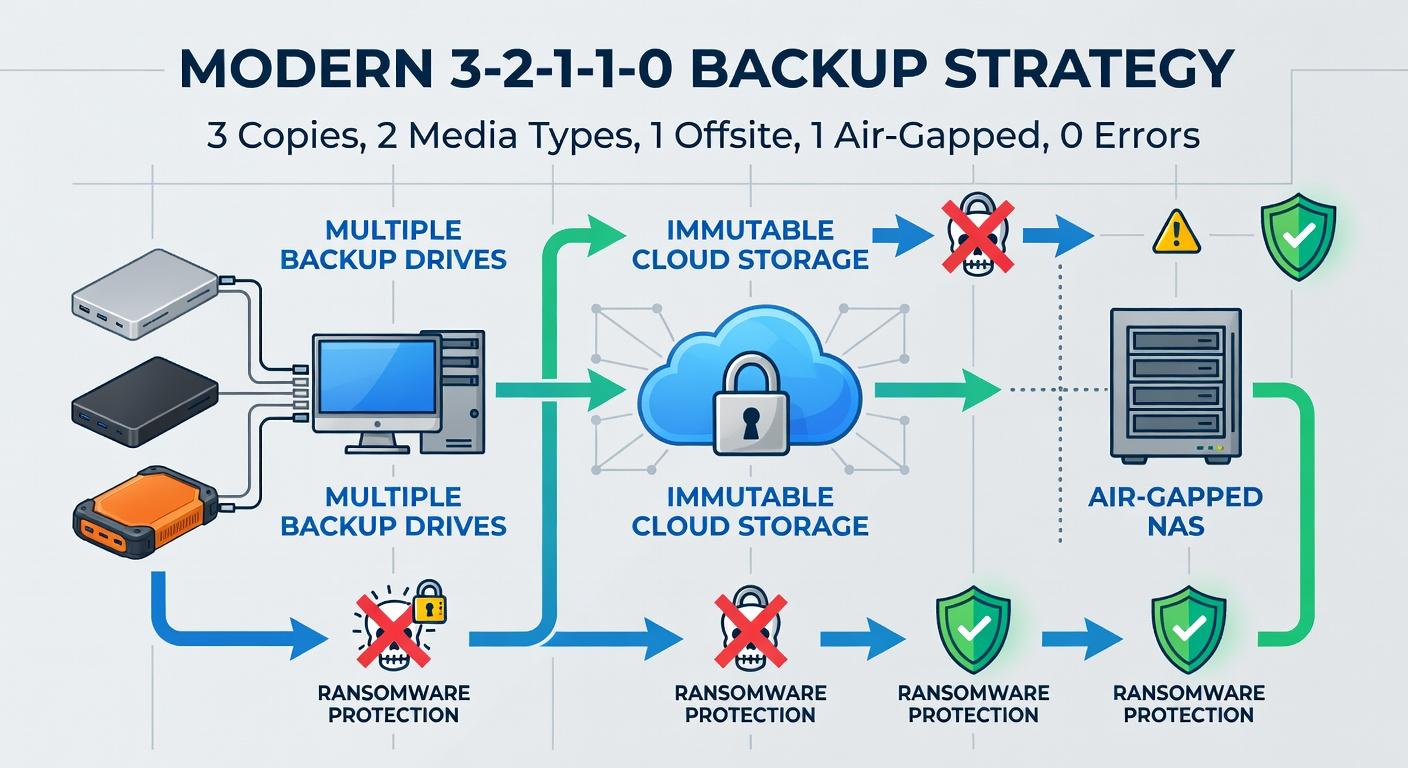
That's the gap the 3-2-1-1-0 model closes. It keeps everything good about the old rule and adds two things ransomware actually respects: a copy the attacker physically cannot alter, and proof that the whole chain actually works.
The 3-2-1-1-0 model, explained plainly
Break it down and it's simple to remember, even if it takes real discipline to run:
- 3 copies of your data — the production copy plus two backups.
- 2 different media types — for example, local disk/NAS plus tape or cloud object storage. Don't put all your backups on the same storage technology.
- 1 copy offsite — geographically separate from your main site, so a fire, flood, or theft at the office doesn't take out your recovery option too.
- 1 copy immutable or air-gapped — this is the new part. At least one copy must be unreachable or unmodifiable by anyone with normal admin credentials, including a compromised domain admin account.
- 0 errors — backups are verified continuously and tested for actual recoverability, not just checked for a green "completed" status in a log file.
That fourth "1" — immutability or air-gapping — is the single biggest upgrade over the old model, and it's the one most small businesses skip because it costs a bit more or takes a bit more setup. Object-lock storage buckets, WORM-capable NAS appliances, or a rotated set of tapes/drives that are physically disconnected after each backup job — any of these qualify. What doesn't qualify: a backup share that stays mounted and writable 24/7 from the same server that just got hit with ransomware.
What CISA's #StopRansomware guidance actually asks for
CISA's advisory language on this isn't vague. It states that organizations should ensure all backup data is encrypted, immutable — meaning it cannot be altered or deleted — and covers the entire organization's data infrastructure, not just the servers someone remembered to include. That last part matters: I still see companies backing up the ERP database religiously while the file server holding scanned contracts and HR records sits outside the backup job entirely.
CISA also flags something worth taking seriously before you buy anything: cloud vendors offering "immutable" storage can protect data without a separate environment, but that immutability doesn't automatically satisfy every regulatory requirement, and a misconfigured retention policy can quietly rack up storage costs you didn't budget for. Read the fine print on retention locks before you commit — test the lock settings in a sandbox bucket first, not on your production backup set.
Set your RTO and RPO before you shop for tools
Too many SMBs buy a backup product first and figure out their recovery expectations later. That's backwards. RTO (Recovery Time Objective) is how long you can tolerate being down. RPO (Recovery Point Objective) is how much data you can afford to lose, measured in time — an hour of transactions, a day, a week. Downtime isn't cheap either way: businesses lost an average of $300,000 per hour during outages in 2024, and that number alone should justify a proper conversation with management before you touch a single backup appliance.
Run a short Business Impact Analysis first. Ask, honestly, per system: if the Odoo server, the accounting database, or the CCTV recorder went down right now, how many hours could the business absorb before it hurts, and how much data loss is actually acceptable? An accounting system usually needs an RPO measured in minutes to hours — nobody wants to re-enter a day of invoices. A CCTV archive can often tolerate a much looser RPO. Document these numbers per system, not as one blanket policy, and build your backup frequency and DR plan around them — not the other way around.
Where does the "offsite" copy go under Oman's PDPL?
This is the part that trips up a lot of IT managers here, because "offsite" used to just mean "somewhere else." Under Oman's Personal Data Protection Law, the safer approach is to select cloud providers that maintain data centers physically inside Oman, and to apply encryption to any personal data before it ever crosses the border if a foreign provider is unavoidable. If you're backing up HR files, customer databases, or anything with personal data in it, don't default to a generic international cloud bucket just because it's cheap — check where the region actually sits, and encrypt client-side before upload regardless.
There's also a notification obligation worth knowing before, not after, an incident: if a breach occurs, the controller is required to notify the Ministry and the affected data owners. That obligation exists whether your backups saved you or not, so a solid immutable backup doesn't remove the compliance step — it just means you're notifying from a position of "we recovered everything" rather than "we lost everything and can't say what."
Build a restore-testing schedule that actually proves something
A backup job that completes successfully every night tells you almost nothing about whether you can recover. The "zero" in 3-2-1-1-0 exists because neglecting regular restore testing is exactly how organizations discover — during a real incident — that the backup file is corrupted, the encryption key was lost, or the restore takes fourteen hours when the business can only tolerate two. Testing needs to be scheduled, not aspirational:
- Monthly: restore a single critical file or database table to a scratch environment and confirm it opens and reads correctly.
- Quarterly: do a full restore of one critical server (the Odoo/accounting server is a good candidate) to an isolated VM and time the whole process against your documented RTO.
- Annually: run a full disaster recovery simulation involving the whole stack — server, network config, and at least one CCTV/NVR restore — and write down what broke.
Keep a written log of every test: date, what was restored, how long it took, and any failures found. That log is your evidence the plan works, and it's exactly what an auditor or a nervous business owner will ask for after reading a ransomware headline.
A one-page checklist to hand to management this week
- Confirm you have 3 copies of every critical dataset, on 2 different media types.
- Confirm 1 copy sits offsite, ideally in an Oman-based data center if it contains personal data.
- Confirm 1 copy is immutable or air-gapped and cannot be reached with normal admin credentials.
- Document RTO and RPO per system, not as one company-wide number.
- Encrypt any personal data before it leaves Oman's borders, no exceptions.
- Schedule monthly file-level, quarterly server-level, and annual full DR restore tests, with a written log.
- Confirm your breach notification process to the Ministry is written down, not something you'll figure out mid-incident.
If you can't tick every box on that list today, don't panic and don't try to fix all of it in one weekend. Start with the immutable copy — that single change closes the biggest hole ransomware exploits — and schedule your first restore test for next month. A backup you've never restored is just a theory. Test it before an attacker forces you to test it for real.
References
- 3-2-1 Backup Rule Explained (Veeam)
- How to Implement the 3-2-1-1-0 Backup Rule in 2026
- 3-2-1 Backup Rule (Commvault)
- #StopRansomware Guide (CISA)
- #StopRansomware: Akira Ransomware Advisory (CISA)
- Oman's data privacy laws and how Global Companies can comply
- Data privacy handbook for the Sultanate of Oman (PwC)
- Disaster Recovery Plan Guide 2025: Complete Steps & Templates
Image: tawalker — BY (via Openverse)
Leave a comment
Your email address will not be published. Required fields are marked *